CA Office Management Software

Manage Your CA Office with Less Manual Work and Better Control

Practive is an all-in-one CA office management software designed for Chartered Accountants and accounting firms in India.
Manage clients, tasks, employees, documents, billing, communication, attendance and reports from one centralized platform.

Practive CA practice management software

TRUSTED BY 2,000+ CHARTERED ACCOUNTANTS

Why CA Firms Need Office Management Software

Managing a CA office manually becomes increasingly difficult as the number of clients and employees grows.
Partners need visibility into ongoing work, employees need clear task assignments, and clients need timely communication and document requests.
A centralized office management system can help organize these activities and reduce repetitive administrative work.

Manage Your Office in One Place

Instead of maintaining separate Excel files for clients, tasks and employees, keep your important office information organized in one system

Know What Work is Pending

Track tasks by employee, client, service, status and deadline so your team can understand what needs attention.

Reduce Manual Follow-Ups

Automated reminders and communication can reduce repetitive follow-up work with clients and team members.

Manage Billing Alongside Office Work

Create invoices, receipts and quotations and track outstanding amounts from the same platform.

Keep Client Information Organized

Maintain client information, services and related work in a centralized client database.

Manage Employees and Their Work

Assign work, track progress, manage permissions and review employee activity.

Keep Documents Organized

Collect and manage client documents without relying entirely on email or scattered WhatsApp conversations.

Communication

Manage client communication with automated WhatsApp, SMS and email messages.

Client Management for CA Firms

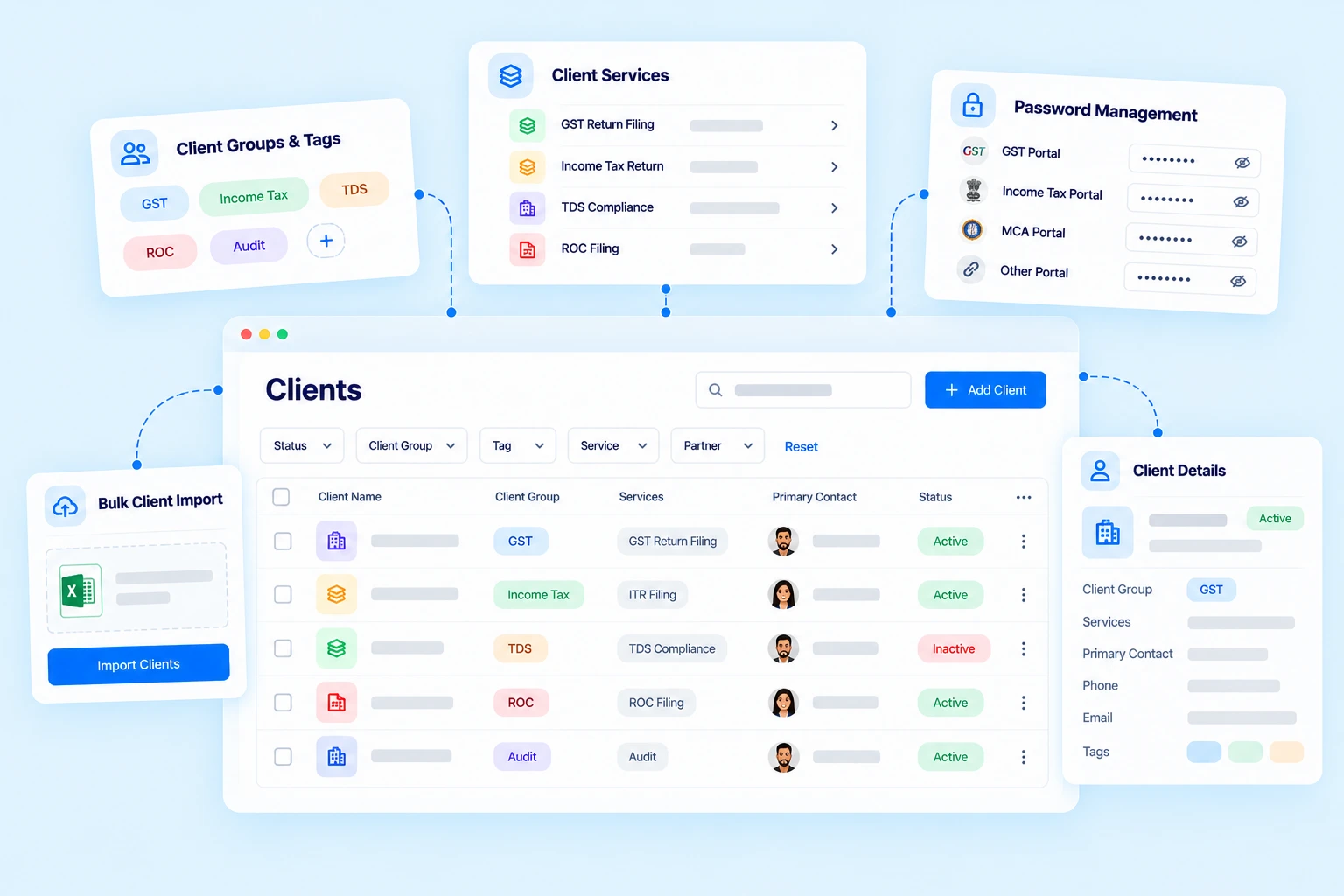
Practive helps CA firms manage client information, services, and records in one centralized platform.

Centralized Client Database

Maintain client details in one place and organize clients according to your firm’s workflow. Import client information in bulk and access relevant records whenever needed.

Client management features include:
Centralized client database
Bulk client import
Client groups and tags
Client-specific information
Services management
Client Management Dashboard for CA Firms

Manage CA Office Tasks

Keep your firm’s daily work organized with centralized task management.
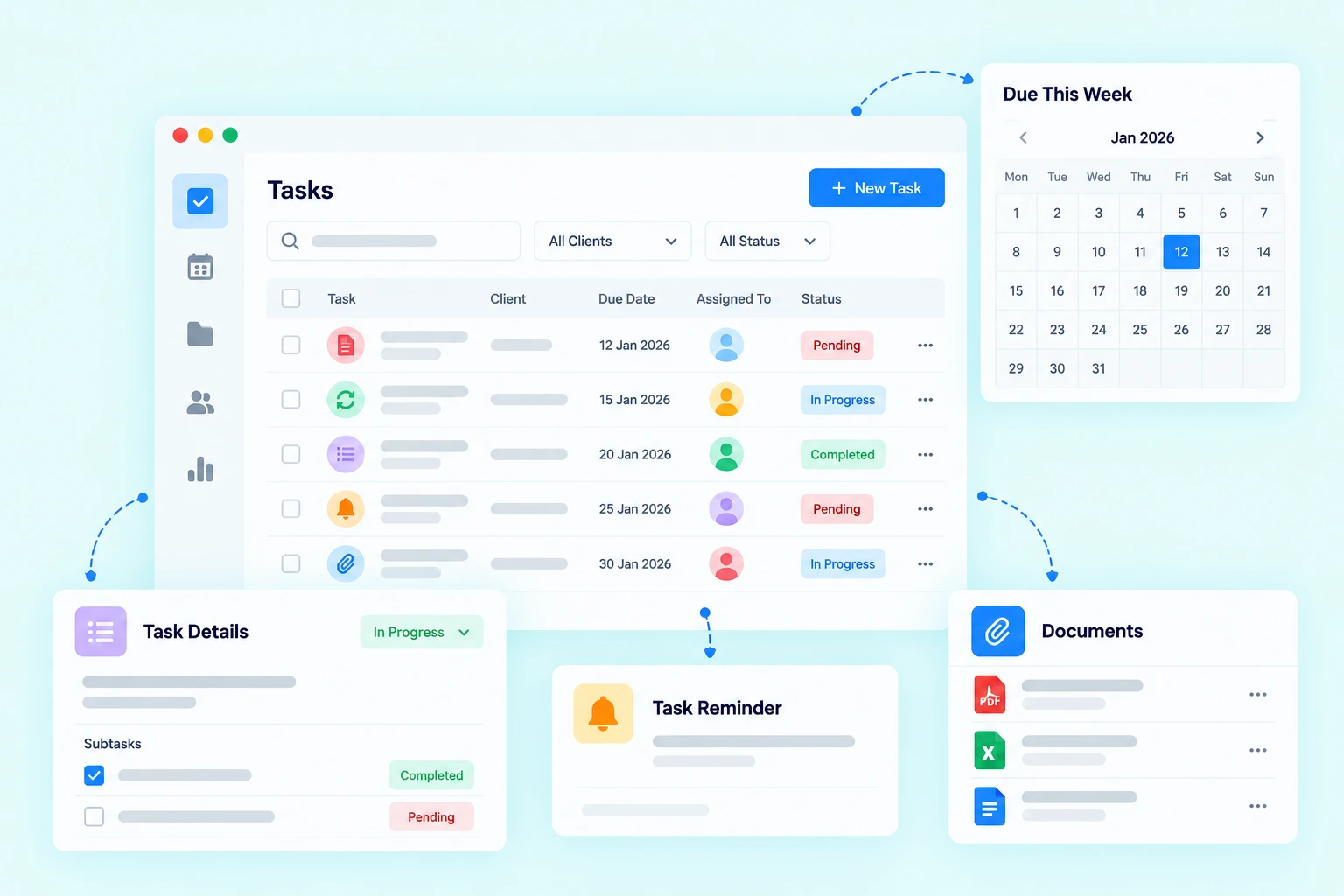
Create tasks, assign them to employees, set deadlines and track progress from one place.
Practive supports both recurring and non-recurring work, making it suitable for regular compliance assignments as well as one-time client work.

Task Management Features
Recurring and non-Recurring tasks
Subtasks and notes
Task deadlines
Task reminders
Task documents and logs

Manage Recurring CA Work

Many CA office assignments repeat every month, quarter or year.
Instead of manually creating the same tasks repeatedly, recurring task settings can help automate the creation of regular work.

Employee & Team Management

Managing employees is an important part of running a growing CA office.
Practive helps partners and administrators organize team members, assign work and control access according to their responsibilities.

Manage Your Team

Manage user roles and permissions
Track assigned work
Monitor task progress
Manage attendance
Track working time

Role-Based Permissions

Different employees may need access to different information.
Practive provides user roles and permissions so administrators can control what users can create, view, edit, delete or export.

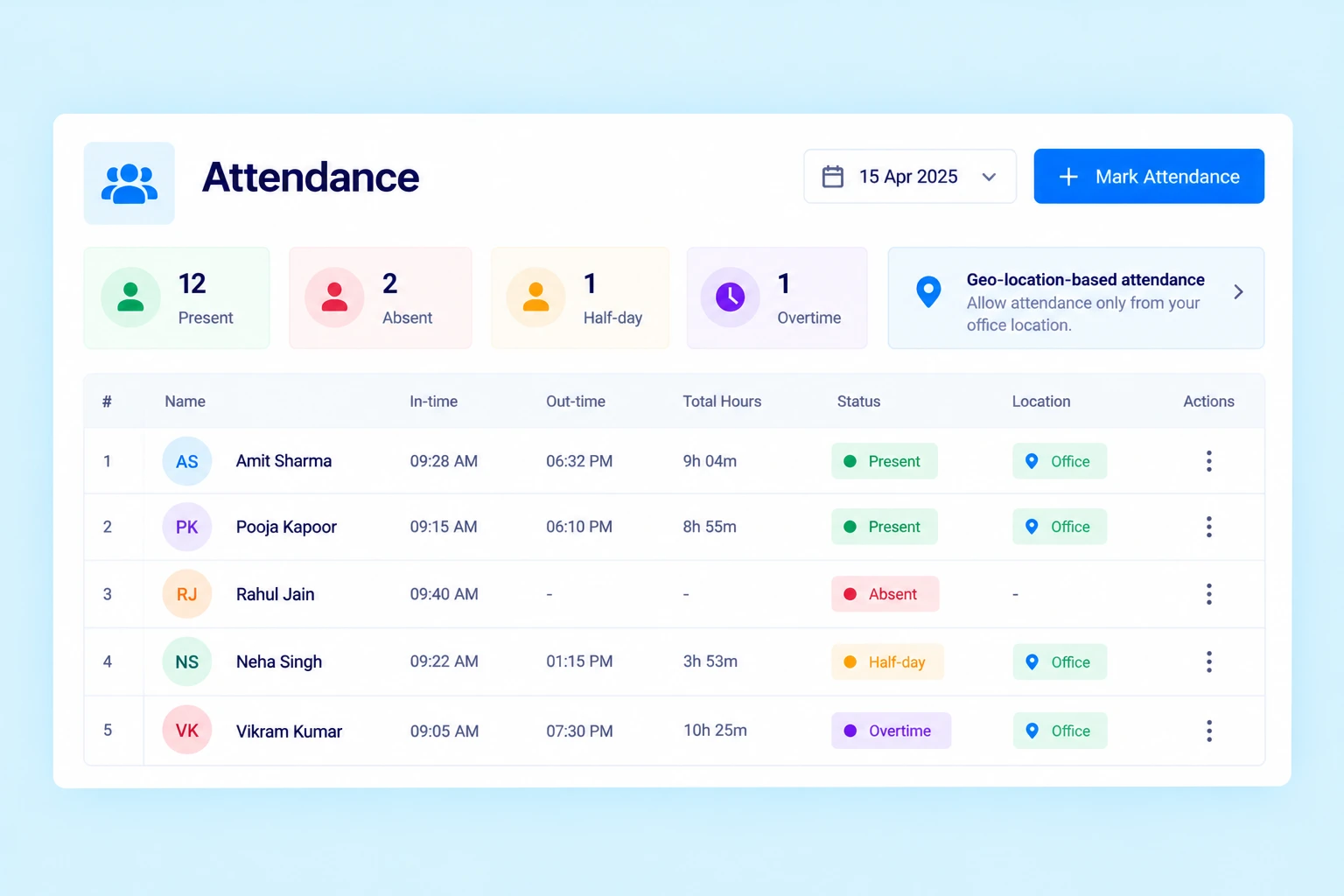
Track Employee Attendance

Manage employee attendance as part of your office operations.
Attendance information can help administrators maintain a better record of employee presence and working patterns.

You can track:
In-time and out-time
Present and absent status
Half-day attendance
Overtime entries
Geo-location-based attendance

Instead of maintaining separate attendance sheets, keep employee-related information within your office management platform.

Track staff attendance and working hours

Timesheet & Work Time Tracking

Understand how your team’s working time is being utilized.
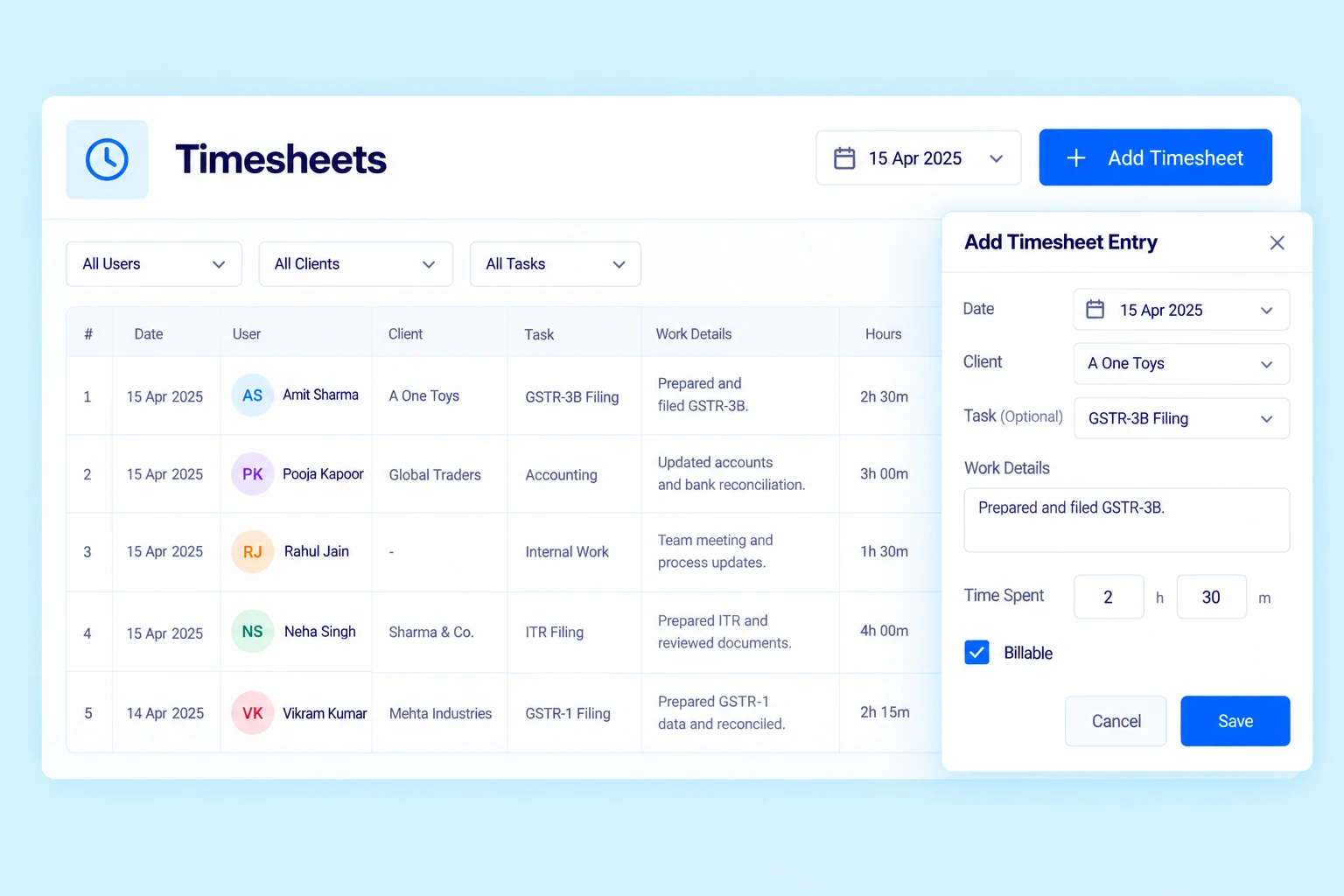
With the Timesheet feature, employees can record the time spent working on client assignments, specific tasks or internal office activities.

Track:
Client work
Task-related time
Internal work
Daily time entries
User-wise time
Task time logs

This can give partners and managers better visibility into how time is being spent across the office.

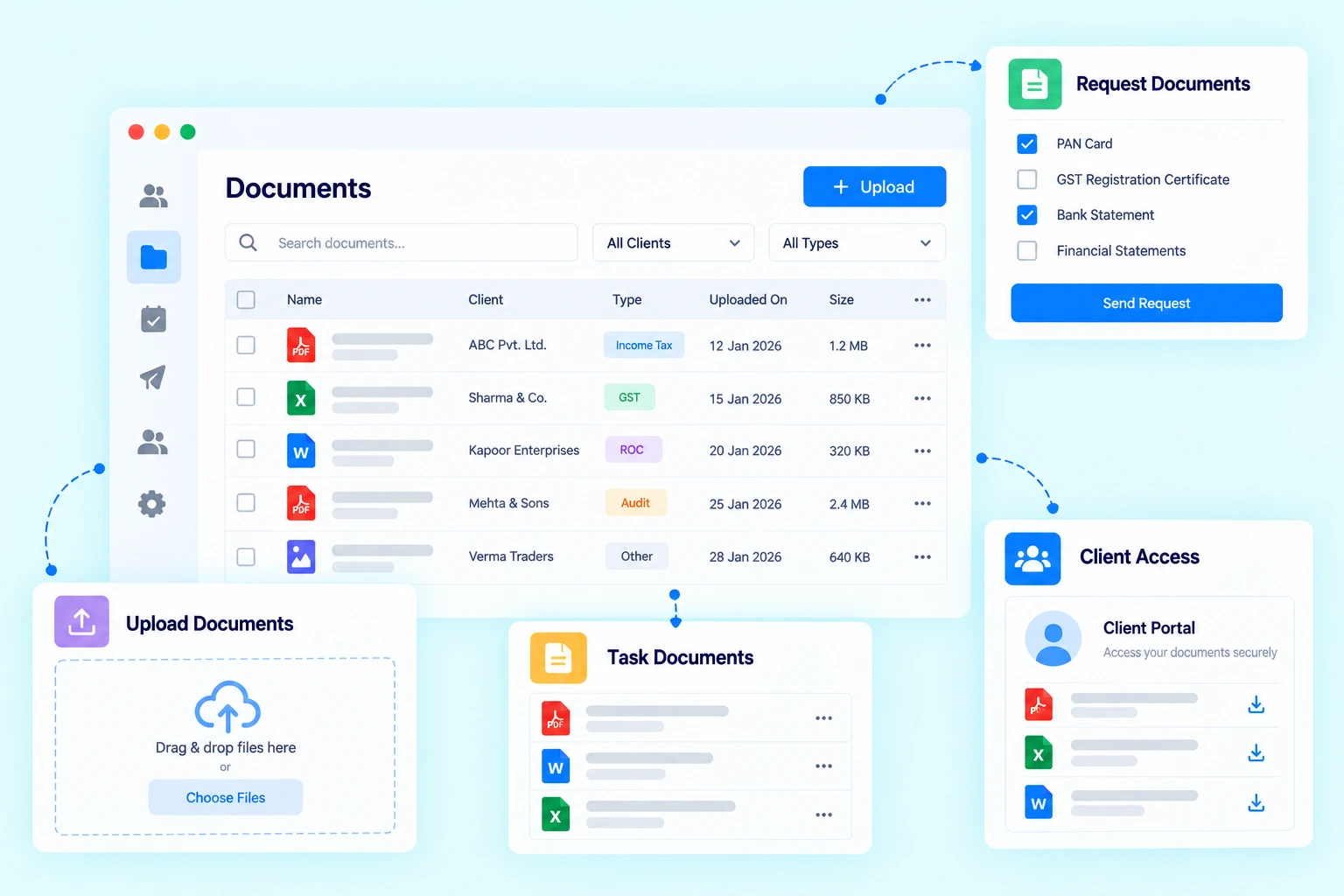
Manage Client Documents

Client documents are an essential part of everyday CA office work.
Practive provides a centralized place to manage documents associated with clients and tasks.

Document Management

Upload client documents
Store task-related files
Request documents from clients
Receive documents from clients
Client portal document access

This can help reduce dependency on scattered email attachments and manual document tracking.

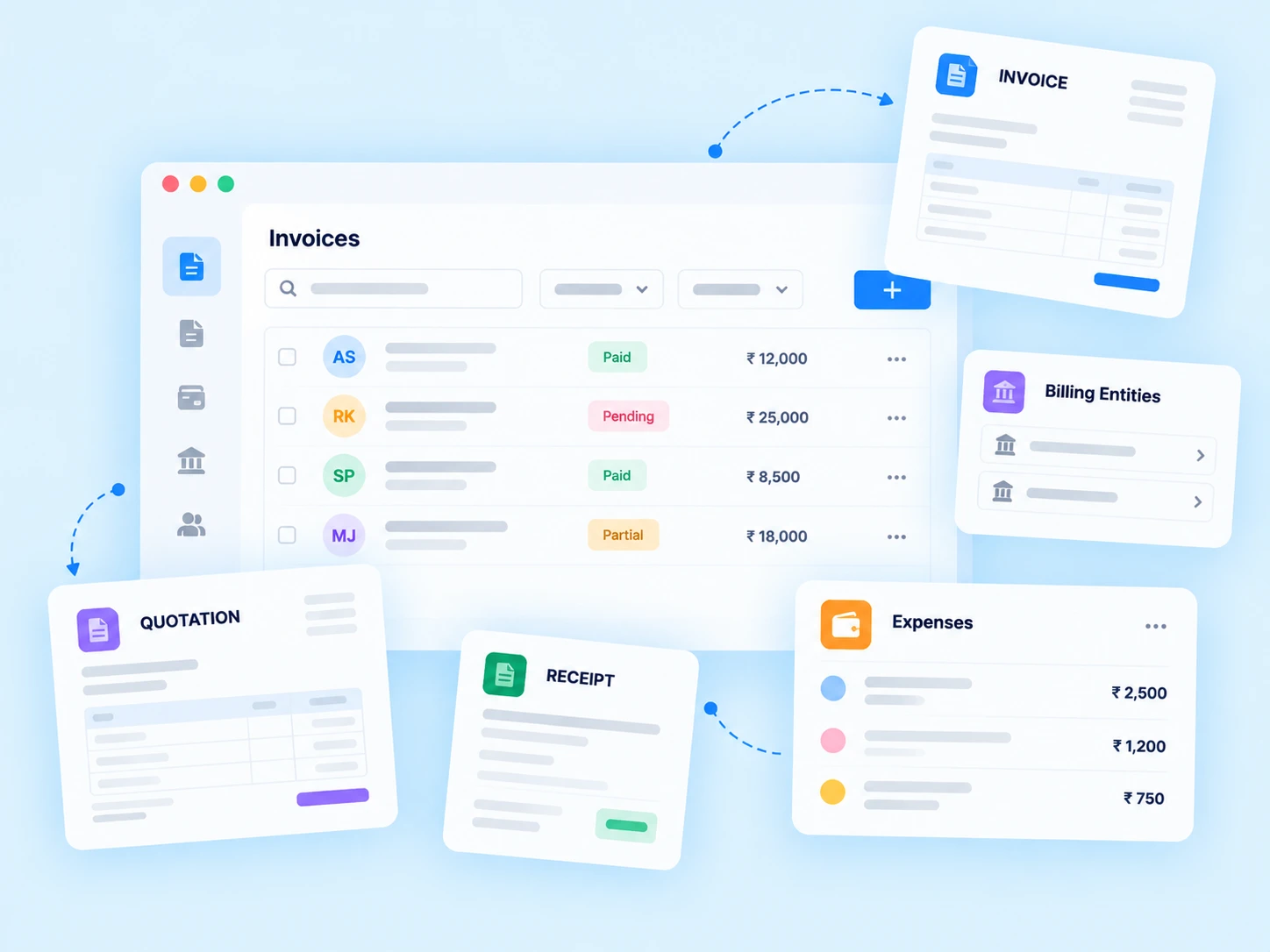
CA Office Billing & Invoicing

Manage billing activities alongside your client and office work.
Practive allows CA firms to create and manage invoices, receipts and quotations while keeping billing information connected to their clients and services.

Billing Features:
Invoices and Receipts
Quotations and Expenses
Payment tracking
Outstanding balances
Retainer billing
Auto invoicing

Manage Multiple Billing Entities

If your firm operates with multiple billing entities, Practive provides billing entity management to help organize billing accordingly.

Client Communication & Follow-Ups

Communication is a major part of CA office management.
Practive helps centralize routine client communication through
WhatsApp, SMS and Email.

Automate Common Communication
Document requests
Payment reminders
Invoice notifications
Task updates
Client notifications
Bulk communication

This helps reduce the amount of repetitive communication that employees need to handle manually.

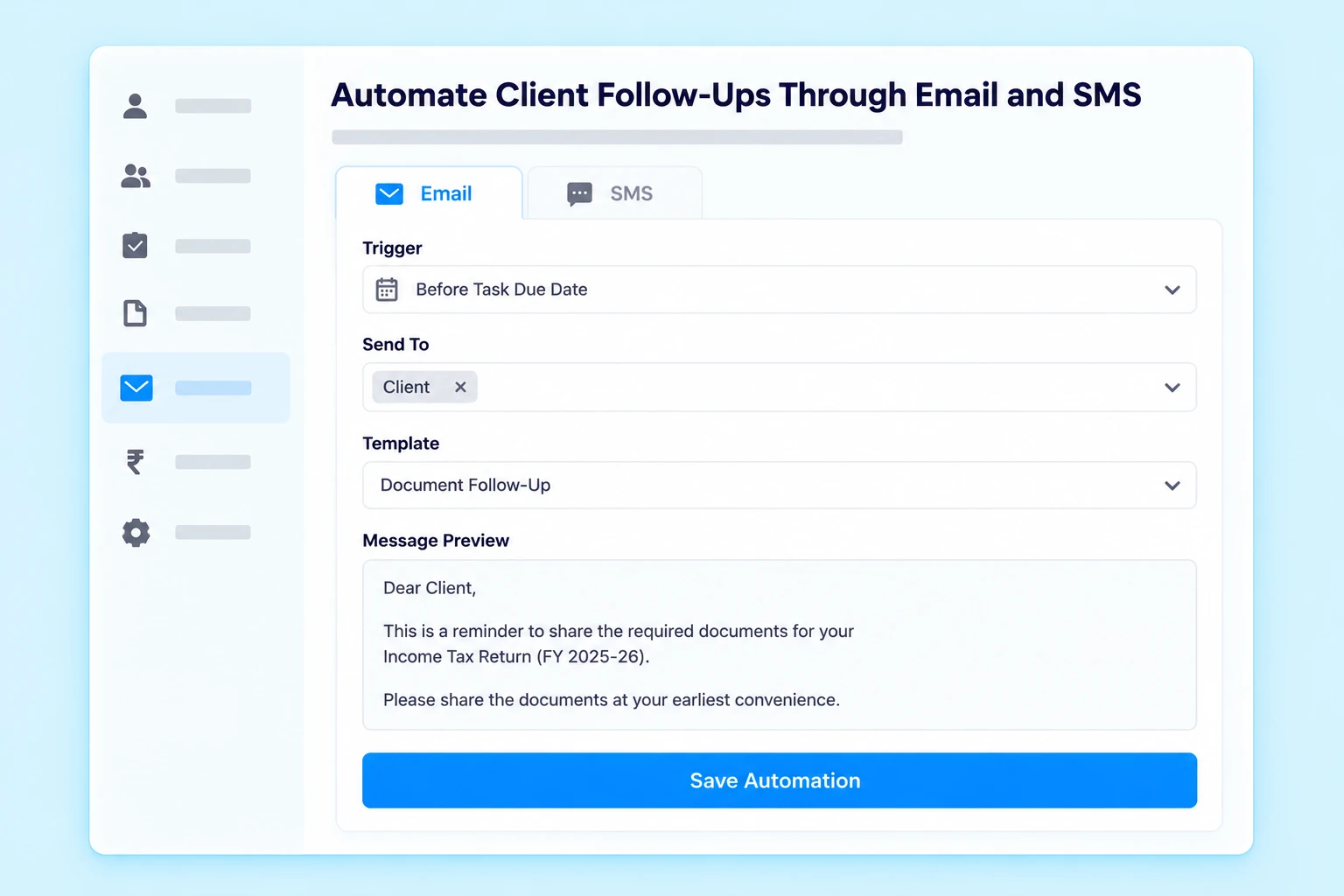
Automate client follow-ups through email and SMS

WhatsApp Automation for CA Offices

WhatsApp is commonly used by CA firms for everyday client communication.
Practive can connect your office workflow with WhatsApp Business API to automate routine client communication.

You can use WhatsApp for:
Sending document requests
Payment reminders
Invoice notifications
Renewal reminders
Client updates

This helps bring client communication closer to your existing office workflow.

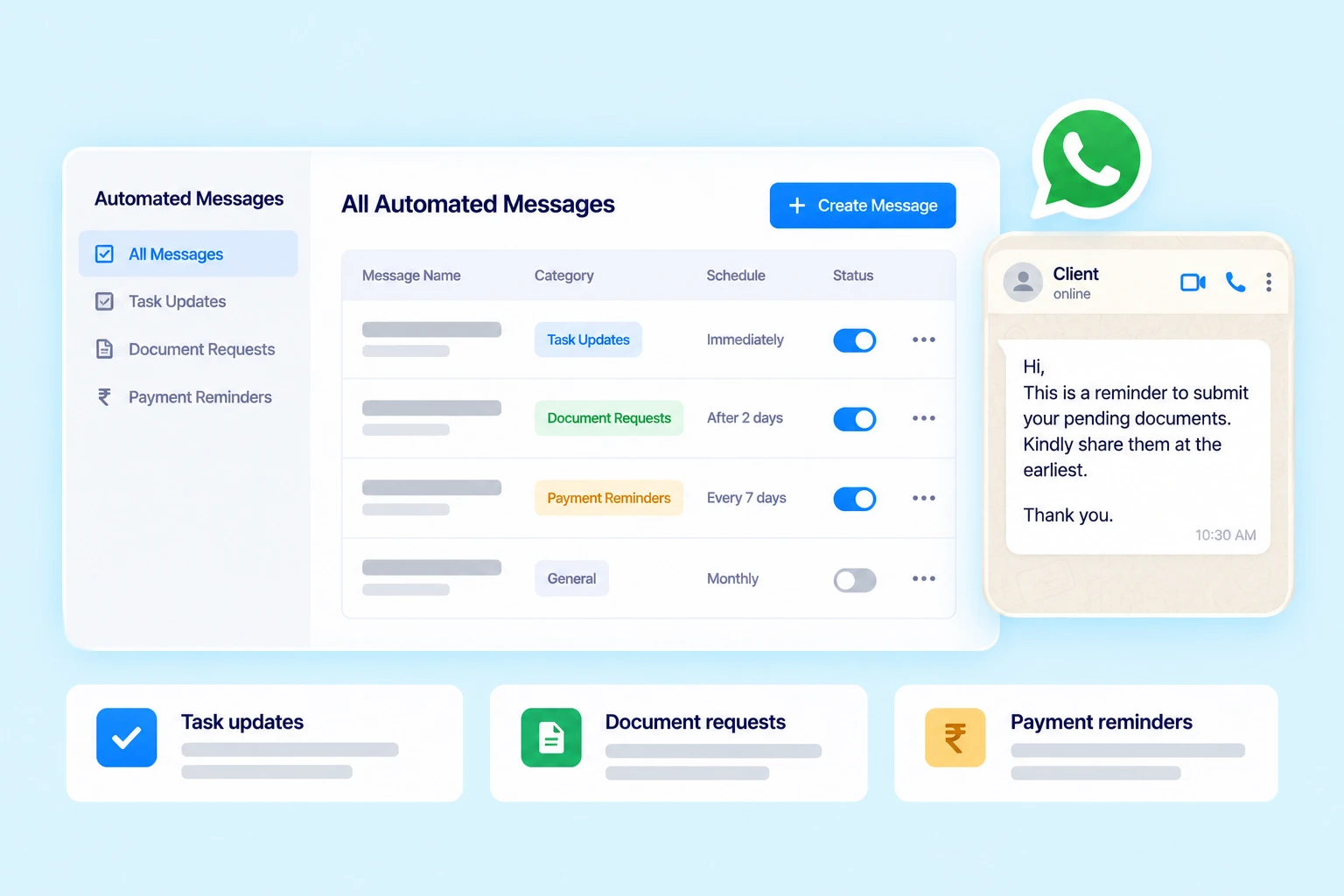
Automate routine WhatsApp messages to clients

Manage CA Office Compliance Work

CA offices handle recurring compliance assignments throughout the year.
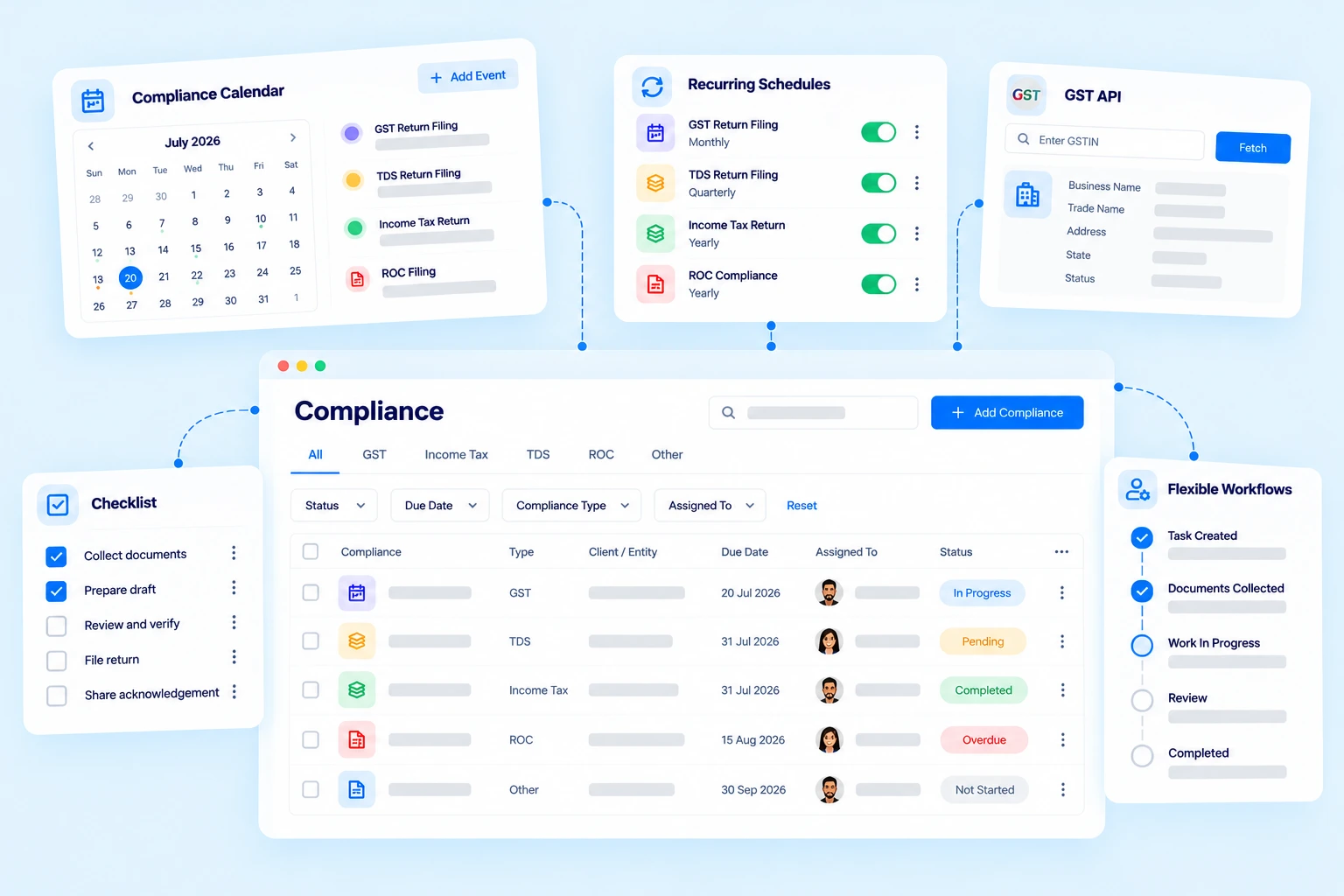
Practive helps organize compliance-related work through recurring tasks, deadlines and reminders.

Manage:
GST-related work
Income Tax work
TDS work
ROC-related assignments
Other recurring task

The Compliance Calendar can also help your team keep important due dates and custom events organized.

Compliance Management Dashboard for CA Firms

CA Office Dashboard & Reports

Partners and managers need visibility into what is happening across the office.
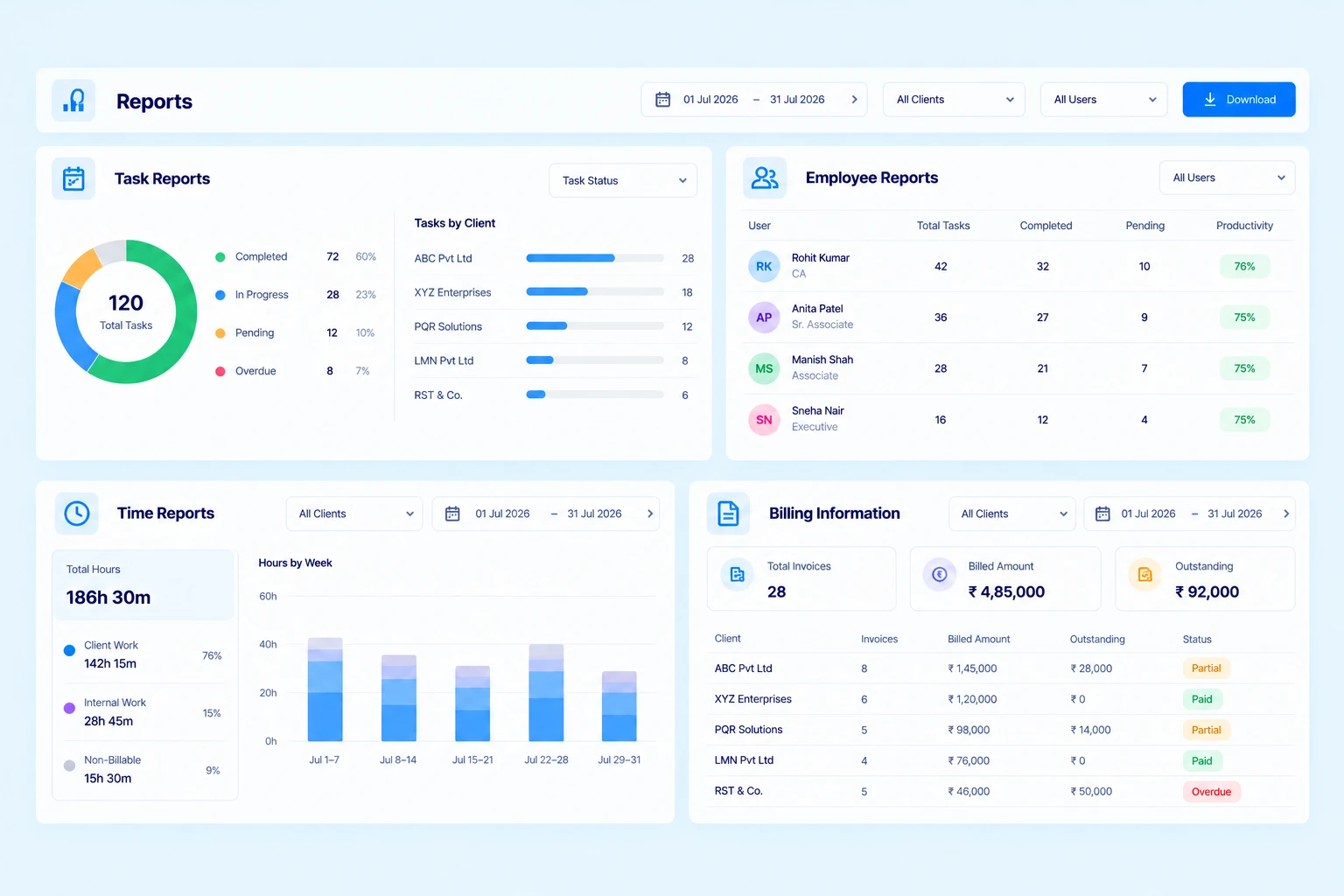
Practive provides dashboards and reports that help you review your firm’s work and activity.

Get visibility into:
Task report
Employee work
Time spent
Billing Report
Outstanding amounts

Instead of asking employees individually for updates, managers can use centralized information to review the current status of work.

Practive Reports Dashboard Showing Task, Employee, Time and Billing Reports

Client Portal for Better Client Interaction

Give your clients a convenient way to interact with your firm.
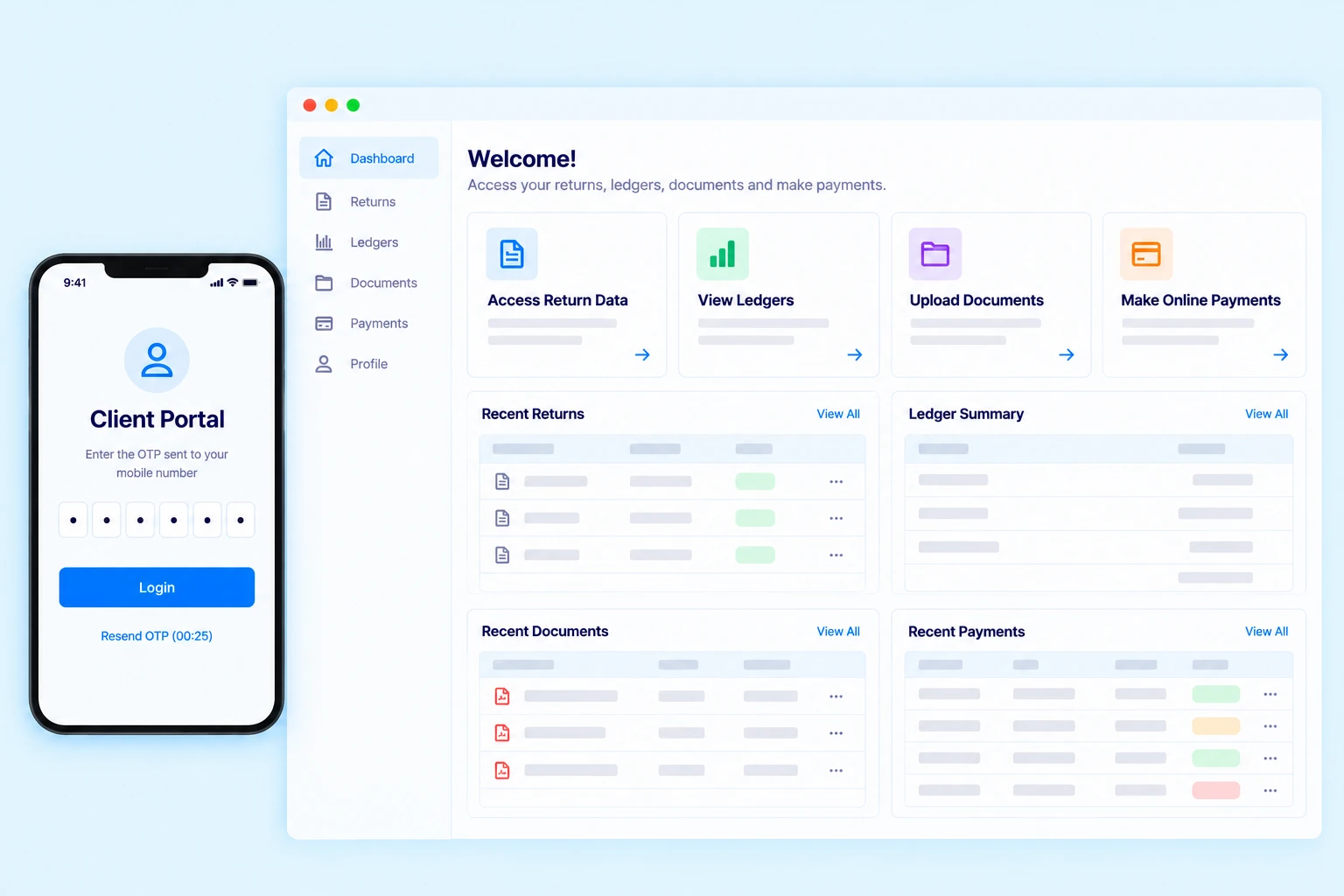
With the client portal, clients can securely access relevant information and submit documents through their login.
This can reduce repetitive requests and make client interaction more organized.

Client Portal Can Help With:

Client access
Document submission
Information access
Task-related interaction
Secure OTP login

Manage Your CA Office Smarter

Bring clients, tasks, employees, documents and billing together in one platform.

Reduce Your Dependence on Excel & Manual Tracking

Many CA offices use Excel spreadsheets for maintaining client lists, task records, employee work and other office information.
Spreadsheets can be useful for many purposes, but managing an entire CA office through multiple spreadsheets can make information difficult to maintain and update.

Client Data

Centralized Client Management

Task and Time Tracking

Task Management and Timesheet

Employee Work

Employee Management & Reports

Documents

Document Management

Billing

Integrated Billing

Communication

WhatsApp, SMS & Email

From Client Onboarding to Billing — Manage the Complete Workflow

Practive can connect different stages of your CA office workflow.

Add Client ➜

Create or import the client into Practive.

Add Services ➜

Define the services provided to the client.

Create Tasks ➜

Create recurring or non-recurring tasks.

Assign Work ➜

Assign tasks to the appropriate employees.

Collect Documents ➜

Request and receive required documents.

Complete Work ➜

Track task progress and completion.

Generate Invoice ➜

Create invoices based on your billing workflow.

Review Reports

Monitor work, time, billing and office activity.

Manage Your CA Office From Anywhere

Practive is cloud-based, allowing authorized users to access the platform online.
Partners and team members can access their office workflows from different locations
without depending on a single office computer.
Your firm’s work remains organized in one centralized system.

Who Can Use CA Office Management Software?

Practive is designed for professionals managing client-based accounting and compliance work.

Chartered Accountants

Manage clients, tasks, compliance assignments, documents and billing from one platform.

CA Firms

Coordinate multiple employees, clients and assignments with centralized practice management.

Accounting Firms

Organize client work, documents, billing and team activities in one system.

CS & Company Secretary Firms

Manage clients, compliance assignments, documents, billing and team activities from one platform.

Tax Practitioners

Manage recurring tax assignments, deadlines, documents and client communication.

Tax Consultants

Keep client information, tasks, documents and follow-ups organized.

What Our
Clients Say​

Hear how Practive is transforming offices across India.

Secure & Reliable Practice Management

Your firm’s client information and documents require appropriate security and access controls.
Practive uses secure cloud infrastructure, encrypted data transmission and user permissions to help protect your firm’s information.

AWS Secured Server​

Hosted on India-based AWS servers built with multi-layer protection and internationally certified security standards.

Encrypted Data​

All your data is encrypted at rest and safely transmitted over protected HTTPS/SSL channels to prevent unauthorised access.

Strict Data Privacy

We follow strict privacy practices, ensuring your data remains confidential and is accessed only when necessary for support.

2 Factor Login​

T-OTP based verification adds an additional shield to prevent unauthorised logins and strengthen overall account security.

Data Backup​

Regular and automated backups ensure your critical information stays safe and can be quickly restored whenever needed.

Role-based Access

Granular permission settings guarantee that users only see and access what they are authorised to work on.

Active Firewall Defence

Multi-layer firewall security continuously monitors and blocks unauthorised attempts, ensuring platform-wide protection.

Regular Security Audits

Routine internal audits, system checks, and vulnerability assessments maintain long-term stability and strong data protection.

Benefits of Using Practive for CA Office Management

Centralized Information

Keep client, task, document, billing and employee information in one platform.

Less Manual Work

Automate recurring work and routine communication.

Better Team Coordination

Assign work and monitor progress across your team.

Improved Client Follow-Up

Use automated communication and document requests to reduce repetitive follow-ups.

Organized Billing

Manage invoices, receipts, quotations and outstanding amounts from the same platform.

Accessible From Anywhere

Access your CA office management system online from wherever you work.

Why Choose Practive for CA Office Management?

Running a CA office requires coordination between people, clients, tasks, documents and billing.
Practive connects these activities in one system designed specifically around the workflow of Indian Chartered Accountants and accounting firms.
Instead of using separate tools for different parts of your office, you can manage your firm’s daily operations from one centralized platform.

Frequently asked questions

CA office management software is a platform that helps Chartered Accountants manage the daily operations of their office, including clients, tasks, employees, documents, billing, communication, attendance and reports.

Practive allows you to manage clients, tasks, recurring work, compliance assignments, documents, billing, employees, attendance, timesheets, communication and reports from one platform.

Yes. You can add employees, assign tasks, manage user roles and permissions, track work and use reports to review employee activity.

Yes. Practive provides client and task-related document management and allows firms to request and collect documents from clients.

Yes. Practive supports WhatsApp Business API-based communication along with SMS and Email for supported business communication workflows.

Yes. Practive provides invoices, receipts, quotations, expenses, outstanding tracking, TDS, discounts and other billing functionality.

Yes. Practive provides a client portal where clients can securely access relevant information and submit documents.

Yes. The Timesheet feature allows users to record time spent on client work, tasks and internal activities.

Yes. Practive is a cloud-based CA office management platform that can be accessed online by authorized users.

Simplify Your CA Office Management With Practive

Bring your clients, tasks, employees, documents, billing and communication together in one platform.

Start managing your CA office smarter.